The Problem
One email, then silence
Reps typically send one generic email and move on — no follow-up, no personalization, no system to track who replied or who's still waiting on a next touch. Deals that just need one more nudge get quietly dropped.
How It Works
Three workflows, one shared queue
Coordinated through a shared Google Sheet instead of in-workflow merges, so each piece runs and fails independently.
2A — Lead Enroller (triggered by Lead Scraping)

Receive qualified leads
A webhook receives the batch of qualified leads POSTed straight from the Lead Scraping & Enrichment workflow.
Deduplicate against the queue
Checks the Outreach Queue for emails already enrolled, so re-running the lead scan never double-enrolls someone.
Claude writes the opening line
One specific, non-generic first sentence per lead, using their name, title, company, and the AI fit rationale — explicitly banned from stock cold-email phrases.
Send email 1 and queue the row
Sends the first-touch email, then logs a tracking row — thread ID for reply matching, step 1, next send date 3 days out.
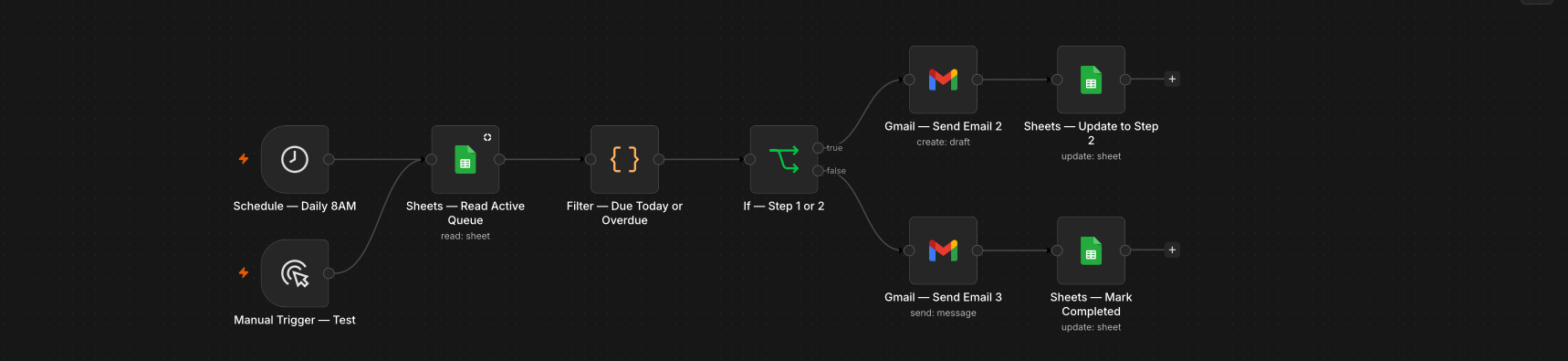
2B — Daily Sequence Sender (weekdays, 8am)
Read what's due
Pulls the full Outreach Queue and keeps only rows whose next send date has arrived.
Advance the sequence
Step 1 leads get email 2 (follow-up, +4 days). Step 2 leads get email 3 (final note) and are marked Completed — the row stops being picked up.
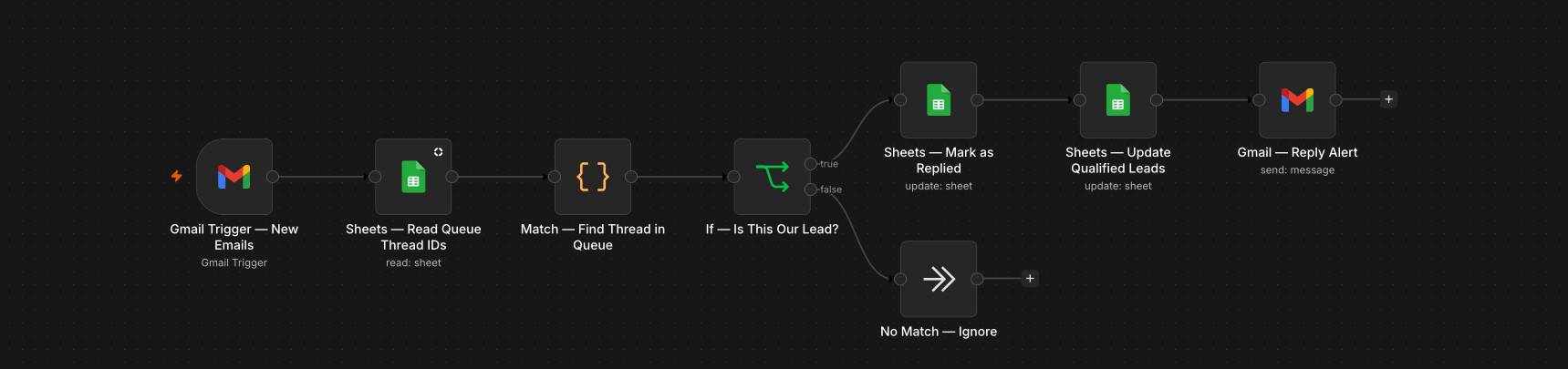
2C — Reply Handler (polls every 5 minutes)
Match replies to the queue
Checks whether an incoming inbox email's Gmail thread ID matches an enrolled lead.
Pause the sequence and alert the rep
A match immediately marks the row Replied, clears the next send date so no further sequence email goes out, and pings the rep in Gmail with the reply preview and lead context.
The result: 3x more touchpoints per lead with zero extra rep time — the sequence runs unattended, and reply rates typically improve 20–40% thanks to per-lead personalization on the opening line. A reply halts the sequence instantly, so no automated email ever lands after the prospect has already responded.
Tech Stack